Be My Eyes using Raspberry Pi and AI
I first heard about Be My Eyes a few years ago - an app that connects blind and visually impaired people with sighted volunteers through video calls. You point your camera at something you can't identify, and a volunteer describes it to you.
Recently I was reading something and a similar concept surfaced. I had a Raspberry Pi Zero 2 W lying around and this seemed like the perfect project to build something physical which I can hold in my hand. I ordered in the camera module and other components to get this going.
What I built
The device is simple. It has a camera, a small OLED screen, a push button, and a speaker. When you press the button, it captures an image, sends it to GPT-4o for analysis, shows the description on the screen, converts text to speech and speaks it out loud through the speaker.
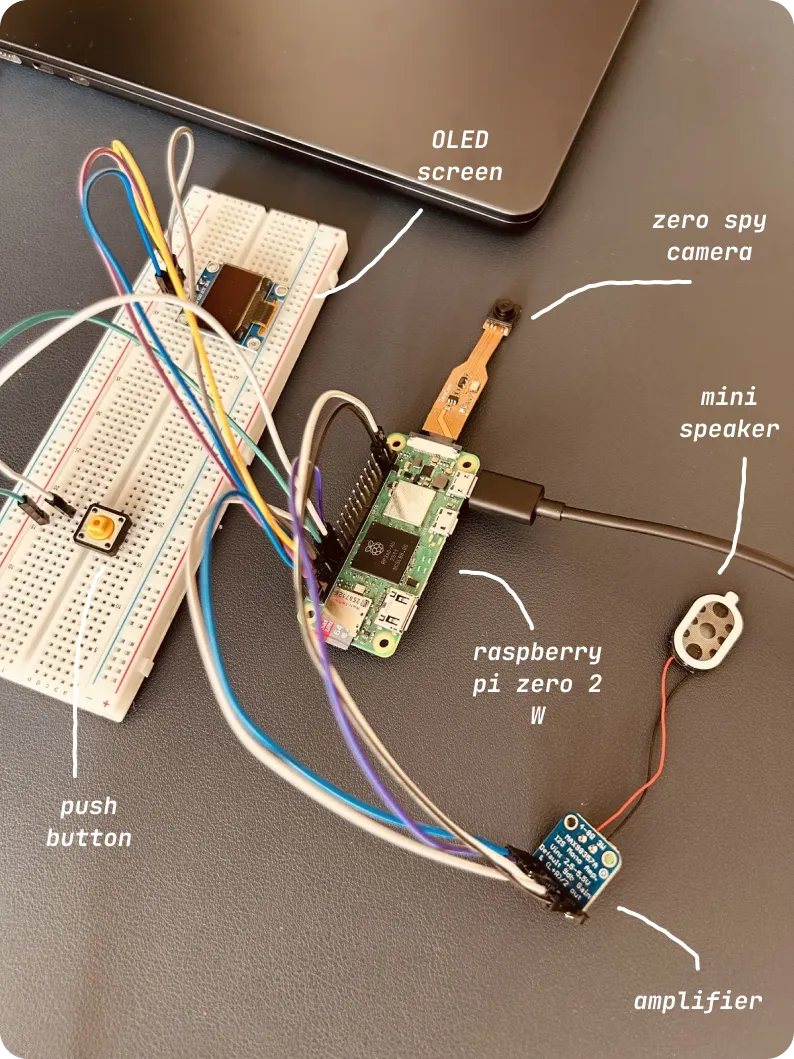
Think of it as having someone describe your surroundings on demand. Point the camera at your fridge, press the button, and it tells you what's inside. Point it at a document, and it reads the key points. Point it at a room, and it describes what's there.
You can see the demo here.
The journey
The first hurdle was just getting the Pi set up. Installing the OS, connecting via SSH, figuring out how to code remotely via en editor. Then came the camera. I got it to take a photo and save it. That felt good. Next was sending that photo to OpenAI's GPT-4o. I pointed it at my desk, and it described it pretty well.
But this was all through code in my terminal. I wanted it to be a device you could actually use. I added a push button. Then I wired up the the OLED display and text appeared on the screen.
The final piece was audio. I added a small amplifier and speaker. Now instead of just showing text, the device speaks the description out loud. This made it actually useful for someone who can't see the screen. The whole thing took an evening to set up and some hours looking up error messages.
What I learned
You can truly just do things. All you need is an internet connection to figure stuff out.
On top of it, Raspberry Pi ecosystem is amazing. People have built libraries for everything and you're rarely building from scratch.
I learned what I2C and I2S are. Not deeply, but enough to use them. I2C is how the display talks to the Pi. I2S is how audio flows to the speaker. That's all I needed to know to make things work. I had build side projects earlier to use vision models and TTS capabilities so that part was prettty sorted.
What's next
I'm thinking of adding voice commands. Instead of pressing a button, you could say "Hey, what do you see?" and it would automatically capture and describe. I have a microphone module that should work for this.
I also want to make it portable with a battery pack. Right now it needs to be plugged in. Making it truly portable would make it actually usable in daily life.
Final thoughts
I just wanted to build something specific and figured it out along the way. The code is straightforward. The wiring is simple once you understand which pin goes where. The hard part was just starting and pushing through the inevitable "why isn't this working" moments.
If you've been curious about hardware projects but haven't tried one, start small. Pick something you want to build and work backwards from there. You'll be surprised how much you can figure out along the way.
You can checkout the code in this github repo.